Evidence and reports
Every run writes evidence you can inspect. TanCat records each step, captures a screenshot, and keeps a run history, so a passing suite is something you can audit rather than something you take on trust.
What is captured
For each test, a JSON sidecar records:
- the test name, its
condition_refandstory_ref, status and duration; - the page each step ran on;
- every step - type, label, locator, value, and the element it matched;
- the screenshot file for that step;
- the result of the step: passed/failed, elapsed time, run count;
- a run history (total / passed / failed) across re-runs.
A trimmed sidecar looks like this:
{
  "schema_version": "1.0",
  "test": {
    "name": "test_01_login[chromium]",
    "condition_ref": "TC-01",
    "story_ref": "S01",
    "status": "passed",
    "duration_s": 5.095
  },
  "page": { "url": "https://www.saucedemo.com/inventory.html" },
  "run_history": { "total_runs": 3, "passed_runs": 3, "failed_runs": 0 },
  "steps": [
    {
      "step": 1,
      "type": "navigate",
      "label": "Navigate to https://www.saucedemo.com/",
      "locator": null,
      "value": "https://www.saucedemo.com/",
      "screenshot": "evidence/test_01_login[chromium]_0_navigate_1791366461.png",
      "url": "https://www.saucedemo.com/",
      "result": { "status": "passed", "elapsed_ms": 3355, "run_count": 3 }
    }
  ]
}
Where the files land
For a generated package:
generated_tests/test_<timestamp>_<slug>/
└── evidence/
    ├── test_<name>[chromium].evidence.json     # one sidecar per test
    └── test_<name>[chromium]_<n>_<type>_<ts>.png  # one screenshot per step
Shared stores live in <root>/evidence/:
| File | Holds |
|---|---|
run_results.sqlite |
Run history across packages. |
rag_store.db |
The local, site-scoped learning store (no telemetry). |
.usage_ledger.json |
The free-tier run/export counters. |
The Evidence & Reports screen
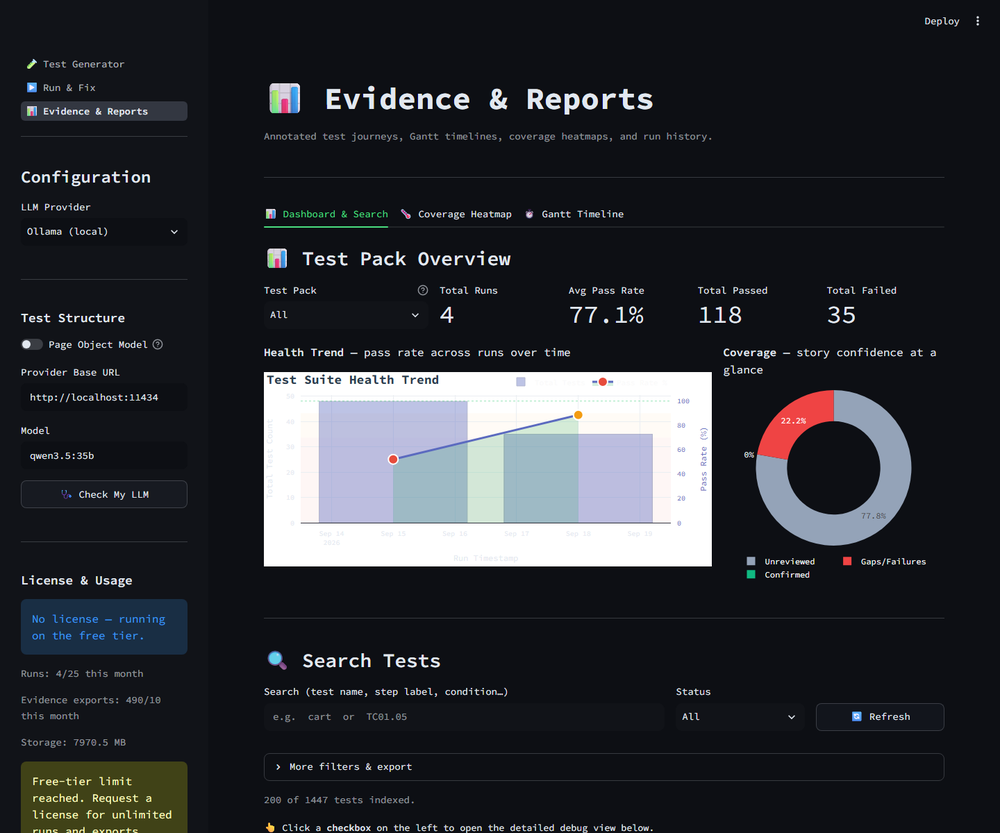
The dashboard: run history at the top, search and export below.
Three tabs cover three different questions:
- Dashboard & Search - what ran, what passed, and a search box over every step.
- Coverage Heatmap - story confidence at a glance: confirmed, unverified, and gaps.
- Gantt Timeline - how a test journey unfolded over time.
Search and export from the command line
The same evidence is available headlessly through cli.evidence_cli:
# Find every failed step that mentions "cart"
python -m cli.evidence_cli search --query "cart" --status failed --verbose

# Drill into result #3 from the last search
python -m cli.evidence_cli detail 3

# Export a JUnit XML file for a CI job
python -m cli.evidence_cli export --format junit -o junit.xml

# Export only failed evidence as CSV
python -m cli.evidence_cli export --format csv --status failed -o evidence.csv
search also accepts --domain, --condition-prefix, --story-ref and
--step-type. export accepts --format csv|ndjson|junit and the same filters.
Reports
The same data can be rendered as a standalone HTML report, Markdown, or a Jira export. The HTML report embeds the screenshots and the step table, so it can be attached to a ticket and read without the tool.