Licensing and tiers
TanCat runs unlicensed on the Free tier. A licence key raises the limits and unlocks the paid features. A licence is an entitlement marker, not DRM - it tells the app what the deployment is allowed to do.
Tiers
| Free | Pro | |
|---|---|---|
| Core test generation | Yes | Yes |
| Evidence export (CSV / NDJSON / JUnit / HTML) | Yes | Yes |
| Self-healing | Yes | Yes |
| RAG / flow-memory learning | Yes | Yes |
| Jira report export | - | Yes |
| Page Object Model mode | - | Yes |
| Multi-site suites | - | Yes |
| CI / headless runs | - | Yes |
| Support | - | Email support and setup help - direct from the developer |
| Updates | - | 12 months included; later updates paid |
| Runs | 25 per 30 days | Unlimited |
| Evidence exports | 10 per 30 days | Unlimited |
Support. Support is provided by email at hello@tancat.dev, by the developer who builds TanCat. You get help with installation, licensing, and defects in TanCat. We aim to reply within two working days, Monday to Friday, UK business hours. Support does not include custom development, third-party systems, or on-site work, and we do not offer telephone or out-of-hours support. A contractual service level is available on request.
The two counters are shown live in the UI sidebar.
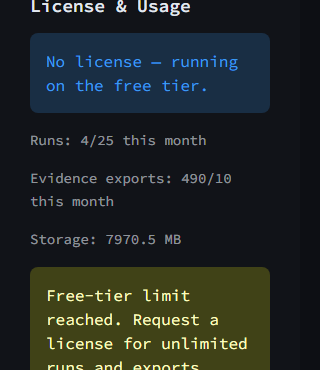
The License & Usage panel. The counters reset every 30 days.
Updates
A licence is perpetual for the version you buy: it does not expire, and the version you hold keeps working. It includes 12 months of updates from the date of purchase. After those 12 months, further updates are paid. Security fixes and bug fixes in the version line you bought stay free for the life of the licence.
Updates are files, not a service. They arrive on Lemon Squeezy and on the releases page, and you choose when to install them. TanCat makes no runtime update check and calls no vendor server to ask for one.
Install a licence key
There are three routes, checked in this order:
AITEST_LICENSE_KEY- the token inline. Best for CI, where you inject it from a secret store:
AITEST_LICENSE_FILE- a path to a file containing the token:
~/.ai-test-gen/license.key- the default key file for the deployment. Save the token there once and the app finds it on every start.
When a valid key is loaded, the UI reports the tier and the deployment it is signed for.
How the licence is checked
At startup TanCat reads the key, verifies its signature against the vendored trust root, and reads the tier from the payload. If no key is present, or the key cannot be verified, the app runs on the Free tier - it does not block you.
Because the tier travels inside the signed payload, an unknown tier key is treated as Free. That is deliberate: a licence that cannot be understood never silently grants more than it should.